How do I delete a document?
Issue you are facing
You are trying to remove a document from your Onboarding event from a specific supplier or for all suppliers. How can you do this?
Solution
For a specific Supplier
In order to remove a document from a specific supplier that you have uploaded you would need to follow the below steps.
- Navigate to the supplier via the "participant summary" you are trying to remove the document from.
- Click on the documents tab.
3. Once on the documents tab you can see a delete (red bin icon) next to the document hosts have uploaded to the documents tab.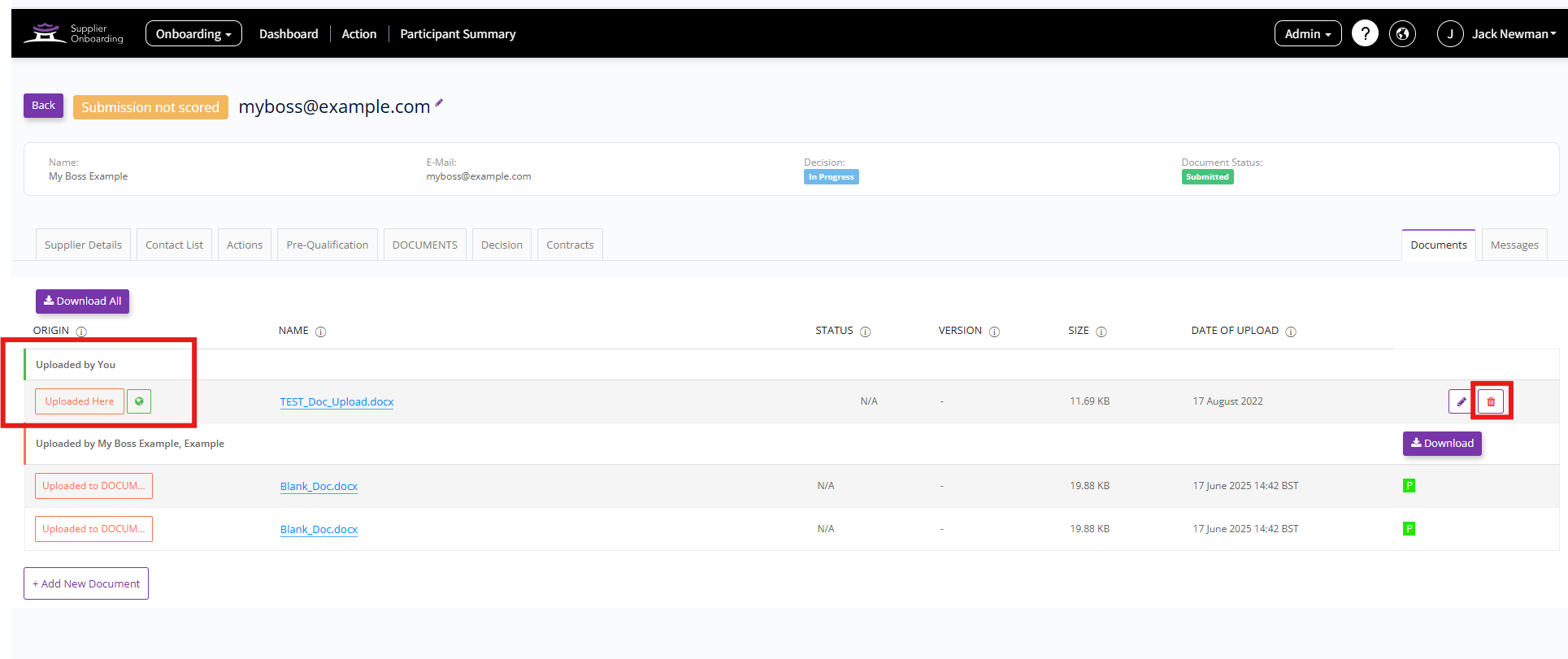
For all suppliers
In order to remove a document from all suppliers then you would need to follow these steps below :
- Whilst on the "Overview" of your Onboarding event place the Onboarding event into edit mode by clicking "Return to editing".
- The page will then change to "Settings". Once here click on the "Documents" tab.
- If you remove the document in this way it will be removed from all participants within your Onboarding event.
Notes
If you would like a to allow a supplier to remove a document they have uploaded to a questionnaire follow these steps.
- Go to the supplier you would like to allow this for via the participants summary and then open their decision tab.
- Once here you can allow a resubmission for the questionnaire they have uploaded this to.
- Once you allow a resubmission for that questionnaire they then will be able to amend the document they have uploaded to the correct document or you can proxy answer this for them with the correct document (if you have this to hand) via their "supplier details" tab.
For more information on how to do this, please check out this article "How do I allow a supplier to change their responses on a submitted questionnaire?".
Please note if you allow a resubmission for a supplier it will reset them back to "re-submission" or "submission in progress" and set them back to the beginning of the approvals process.